
The Best Social Media Calendar Tools For 2026


Need help picking from the best social media calendar tools? I’ve got you covered.
A social media calendar tool helps you create, schedule and publish posts for every major social media platform out there.
Some offer more features than this. Others offer less.
In this post, I compare the best tools the marketing world has to offer for managing your social media calendar, list their best features, and share my thoughts on their advantages and disadvantages.
What are the best social media calendar tools?
Here are our top picks:
- Pallyy – The all-in-one favorite for simplicity, visual planning, and affordability.
- Viraly – A powerful contender with automation and AI-driven scheduling features.
- SocialBee – Best for those focused on evergreen content and timed campaigns.
- Sendible – Perfect for teams managing multiple clients and platforms with ease.
1. Pallyy
Pallyy is a social media scheduling tool whose dashboard is centered around its calendar feature.
I like that it lets me view all of the posts I’ve scheduled for the following month and gives me a visual preview (in the form of a thumbnail) of each post.
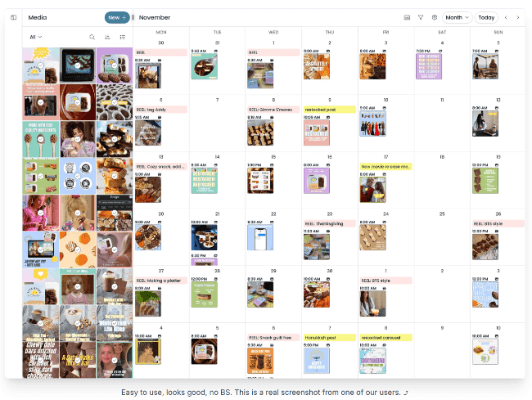
Although Pallyy works with multiple social media platforms seamlessly, it’s the best social media scheduler for Instagram.
It lets you publish images, reels, stories and carousel posts. It also has a bio link tool as well as an editor that makes it easy to plan a special grid design in advance.
I’m especially impressed with how easy it is to use.
The UI (user interface) is clean and well organized, making uploading posts and managing your content calendar a smooth experience overall.
The only major drawback of using Pallyy is its pricing structure, which is only a problem if you have two accounts for the same platform.
For example, a lot of TikTok creators have a main account where they post their best content and a “spam” account where they post more casual content. On Pallyy’s base plan, this would cost $50/month.
On a plus side, they offer unlimited accounts for $199/month. For agencies, this is one of the best deals around.
Key features
- Social media scheduling and publishing
- Arranges content calendar in a grid, like a real calendar
- Content can be viewed on a weekly or monthly basis, or in a list
- Social media inbox
- Social media analytics
- Social media monitoring
- Supports every major social platform
- Built-in bio link tool
- Content bank for post ideas
- Content library
- Collaborative features
Pros
Cons
Pricing
Pallyy has a limited free forever plan. Premium plans start at $25/month after a 14-day free trial. Annual plans have a 25% discount.
Read our Pallyy review.
2. Viraly
Viraly is a social media scheduling tool that focuses on two primary aspects of social media management: scheduling and analytics.
Its UI is entirely centered around your content calendar, arranging everything neatly, featuring thumbnails and labeling everything by post type (reel, image, etc.).
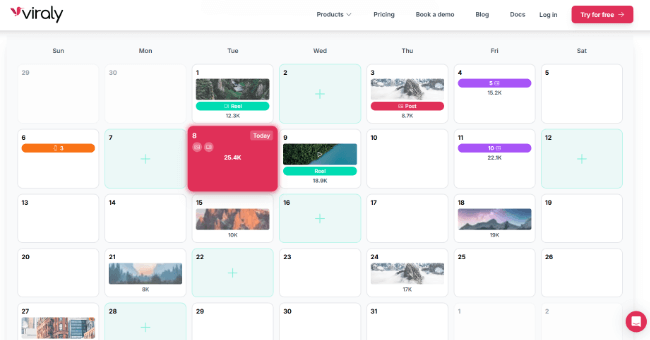
Overall, I found Viraly to be an incredibly easy platform to use and a fantastic way to manage a social media calendar for multiple platforms from a single dashboard.
They’ve put a lot of effort into the core aspect of their platform (scheduling), and they offer a lot of data on a per post base, giving you enough metrics to work with to run any kind of experiment you want.
The biggest disadvantage I noticed with Viraly is its lack of more social media management features, particularly a unified social inbox.
Without this feature, you’ll still need to log into each platform individually to manage comment sections and direct messages (DMs).
Key features
- Social media scheduling and publishing
- Arranges content calendar in a grid
- Content can be viewed on a weekly or monthly basis
- Photo editor
- Video editor
- Social media templates
- Social media analytics
- Team collaboration
- Media library
Pros
Cons
Pricing
Plans start at $19/month after a 7-day free trial. Annual plans have a 20% discount.
Read our Viraly review.
3. SocialBee
SocialBee is a social media scheduling tool that has evolved enough to incorporate other social media management features, including engagement, monitoring and analytics.
The tool’s dashboard has multiple views, one of which is a calendar view you can sort by day, four days, week or month.
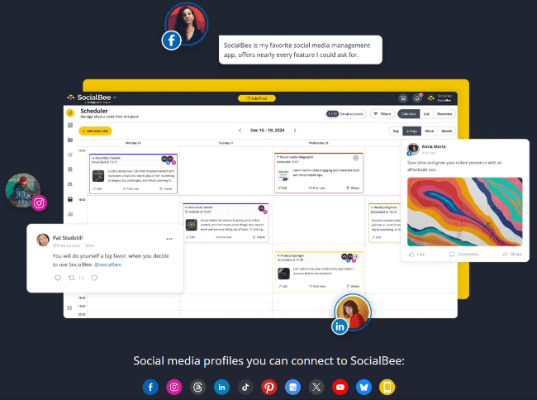
I really like the layout of SocialBee’s calendar view.
It’s arranged in a traditional calendar layout. When you schedule posts in SocialBee, you’re required to assign it to a category.
These categories are color coded, and each scheduled post in your calendar will have a colored label based on the category it’s assigned to.
Each post also has additional labels for each platform you’ve scheduled that post for.
Another feature I like is SocialBee’s requeuing feature, a feature that’s especially powerful for evergreen content.
Queues allow you to set up designated schedules on a per-category basis. Every new post you schedule will fill the next available timeslot automatically.
The requeuing feature allows you to reschedule posts automatically, which puts them at the bottom of the category’s queue so they can repost at a later date.
Requeued posts will even look different if you set up different variants for them.
Key features
- Social media scheduling
- Social media inbox
- Content organization with categories
- Social media analytics
- Team collaboration
Pros
Cons
Pricing
Plans start at $29/month after a 14-day free trial. Annual plans have a 16% discount.
Read our SocialBee review.
4. Sendible
Sendible is an all-in-one social media management tool that offers scheduling, a social media inbox, content management and analytics.
Its dashboard includes a content calendar that lets you view all of the posts you’ve scheduled from different platforms at a glance.
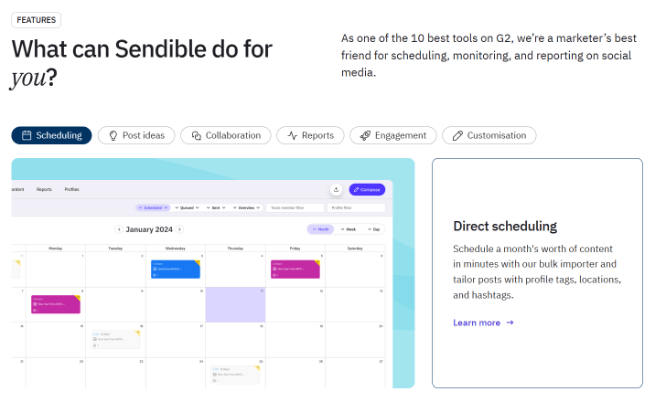
The tool is easy to use overall, but it does take some getting used to as not every feature is as straightforward as it could be.
The biggest drawback is all of the features you don’t have access to when you only have a Creator or Traction plan.
For example, you can’t save drafts to content libraries. This feature is only available on the Scale plan or higher, which is quite expensive.
Now, there are some pretty useful features built right into its post composer. Instead of deciding on a post time yourself, Sendible will select an optimal time for you based on analytics data.
You also have the option of adding posts to queues that will post content at pre-set times you choose. This can help to speed up the scheduling process.
And the calendar itself has a bunch of useful filtering options. For example, you can filter by team member, queue, campaign, profile, and more.
Sendible is also quite affordable for teams. And white labelling is available should you need it.
Key features
- Social media scheduling and publishing
- Social media inbox
- Social media campaigns
- Social media planner
- Content library
- Team collaboration
- Analytics
Pros
Cons
Pricing
Plans start at $29/month after a 14-day free trial. Annual plans have a 15% discount.
Read our Sendible review.
5. Publer
Publer is a social media scheduling tool that specializes in the publishing and planning of social media content.
It’s a pretty simple tool, but its calendar feature is beautifully designed and well organized, allowing you to view everything you’ve scheduled on a daily, weekly or monthly basis.
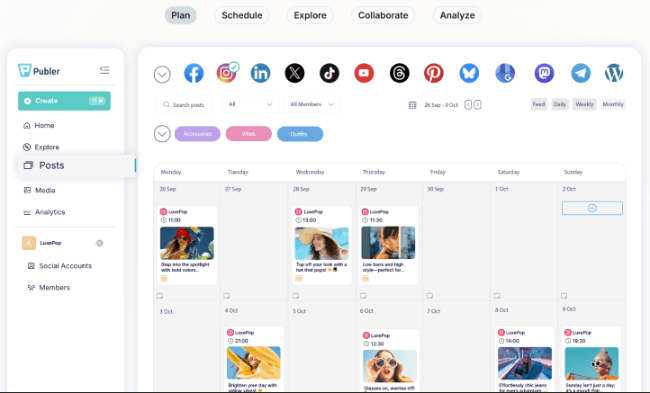
Publer excels as a social media content planner, even if it’s lacking in other features.
It helps you plan and create content for multiple platforms. I especially like that you’re able to use it to curate and recycle content, helping you save time if you need to fill in a timeslot in a pinch.
It’s also quite affordable.
Key features
- Social media scheduling
- Social media analytics
- Content queue
- Content recycler
- Free bio link tool
- Team collaboration
Pros
Cons
Pricing
Publer has a limited free forever plan. Pricing for premium plans starts at $5/month after a 7-day free trial for one social media account and no additional users.
Annual plans come with two months free.
Read our Publer review.
6. ContentStudio
ContentStudio is a full-fledged social media management tool, allowing you to schedule and publish content, manage comments and DMs, track analytics, and keep an eye on numerous content sources outside of your organization.
As a calendar tool, it helps you keep track of everything you’ve scheduled on a weekly or monthly basis.
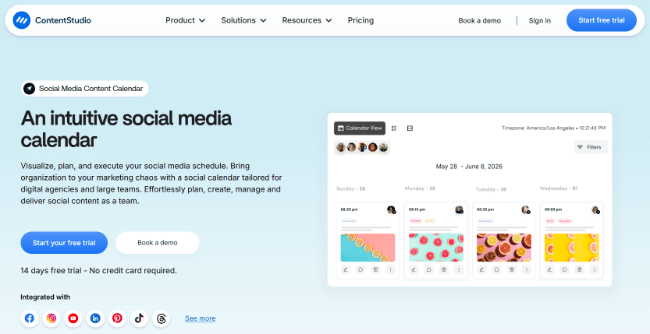
ContentStudio is an impressive tool overall, but it’s more geared toward social media teams than content creators.
A lot of its more powerful features, including content categories, are locked behind an expensive pricing tier.
Key features
- Social media scheduling
- Social media inbox
- Social media analytics, including competitive analytics
- Content curation
- Media library
- Link in bio tool
- Team collaboration
Pros
Cons
Pricing
Plans start at $29/month after a 14-day free trial. Annual plans have up to a 34% discount.
7. Iconosquare
Iconosquare is a powerful social media management tool that includes everything you need to manage your brand’s social media strategy.
Along with a calendar view, it offers a social media inbox, analytics and reporting, and listening.
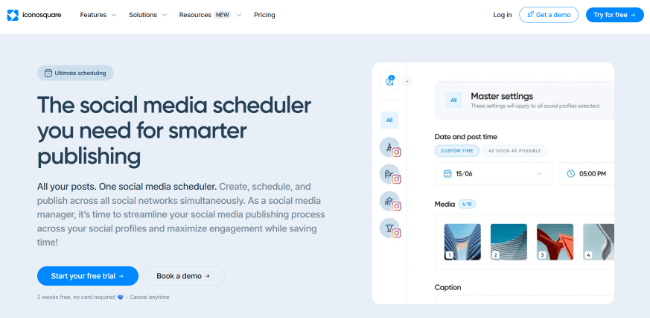
It can be a difficult platform to learn, but it’s incredibly powerful when you do.
As a calendar tool, Iconosquare lets you view everything you’ve scheduled for the day, week or month.
The daily view has hour-by-hour slots.
It’s a powerful tool overall, especially since it has the social listening feature a lot of tools on this list are missing.
Even so, it’s missing key features like a requeue feature or proper content categories.
Key features
- Social media scheduling
- Social media inbox
- Social listening
- Social media analytics and reporting
- Team collaboration
Pros
Cons
Pricing
Plans start at $39/month after a 14-day free trial. Annual plans come with two months free.
Read our Iconosquare review.
8. Agorapulse
Agorapulse is a complete social media management suite. Along with publishing, it allows you to manage your social media inbox, analytics, and what people are saying about you, your industry, and your competitors.
For publishing, you can view the tool’s social media calendar on a weekly or monthly basis, and it includes several filter options.

It’s a pretty intuitive tool to use in spite of all of the features it offers.
And it comes fully loaded with features. The calendar is excellent and so is every feature that it comes with. The platform has been very well designed.
Unfortunately, at a minimum price of $99/month per user, it’s best for agencies or brands who manage a lot of content on most social media platforms.
Key features
- Social media publishing
- Social media inbox
- Social listening
- Analytics and reporting
- Team collaboration
- Calendar notes
- Content library
Pros
Cons
Pricing
Plans start at $99/month after a 30-day free trial. Annual plans have up to a 20% discount.
Read our Agorapulse review.
9. Vista Social
Vista Social is a social media management tool that offers every feature you need to strengthen your social media efforts, from social media publishing and inbox features to social listening.
It’s got one of the most straightforward calendar features out of all of the tools featured on this list, giving you a visual representation of everything you’ve scheduled for the month.
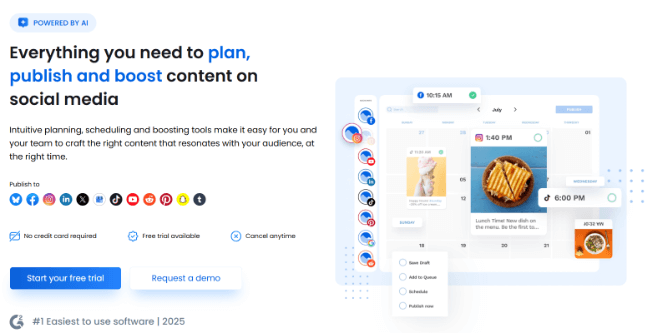
And the calendar is extremely flexible. There are plenty of filtering options & additional features like Instagram & TikTok planners available.
The post composer is excellent and includes some features I haven’t found on too many other platforms. For example, while other platforms allow you to schedule first comments, Vista Social allows you to schedule first likes and integrate Meta ad accounts so you can set up a boost from without leaving the tool.
Content queues are available but they are a bit of an afterthought. Although, still extremely useful to have in there.
Now, Vista Social’s entry-level plans are a bit high compared to other platforms. So, I’d say it’s more suitable for social media managers rather than creators.
Key features
- Social media publishing
- Social media inbox
- Social media analytics
- Social listening
- Queue with predefined timeslots
- Calendar notes
- Media library
- UGC discovery
- Team collaboration
Pros
Cons
Pricing
Pricing starts at $79/month after a 14-day free trial. Annual plans have a 20% discount.
Read our Vista Social review.
10. HopperHQ
HopperHQ is a social media scheduling tool that also offers analytics.
It doesn’t support all social media channels out there, but it allows you to arrange your calendar by week or month and view every platform you’ve scheduled the post for.
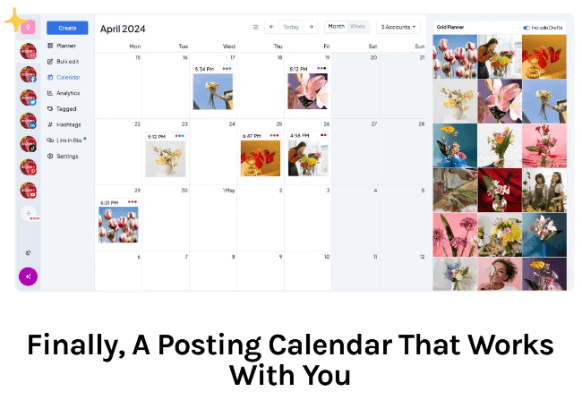
It doesn’t have fancy social media management features, but it’s a powerful scheduling tool overall.
I really like that the grid planner is featured right alongside the calendar itself. And it has some nice AI features included.
Key features
- Social media scheduling
- Social media analytics
- Link in bio
- Image editor
- Team collaboration
Pros
Cons
Pricing
Plans start at $6/month per social media account with discounts offered on annual plans. A 14-day free trial is available.
Read our Hopper HQ review.
11. Sprout Social
Sprout Social is a marketing platform that’s broken down into two primary marketing purposes: social media marketing and influencer marketing.
Its social media marketing platform includes a publishing feature that uses a content calendar.
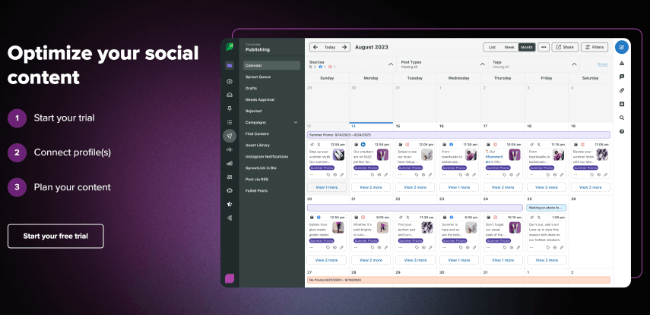
The tool allows you to switch between weekly and monthly views and set up filtered views.
I especially like that it lets you create labels for posts so you know exactly what types of posts you’ve scheduled.
When it comes to publishing posts, I found the composer to be more limited than other platforms.
And while the features on offer are generally quite good, it’s priced more towards enterprise brands so offers little value for money.
Key features
- Social media publishing
- Social media inbox
- Link in bio tool
- Analytics
- Team collaboration
- Post labels
- Media library
- Campaign tracking
Pros
Cons
Pricing
Plans start at $199/month after a 30-day free trial.
Frequently asked questions
These are answers to common questions consumers have about social media calendar tools.
What is the best social media calendar tool?
In my opinion, Pallyy is the best tool to use to manage your social media calendar.
It’s affordable and helps you schedule posts for multiple social channels, even letting you optimize captions and image sizes for each individual platform.
For your calendar, specifically, it lets you see every post you’ve scheduled for the next week or month and allows you to organize everything with labels and subfolders.
It’s also one of the easiest social media management tools to use.
Related: The Best Social Media Scheduling & Publishing Tools Compared
How do you create a social media content calendar?
- Define the goals you want to accomplish with social media (more sales, more email subscribers, etc.).
- Figure out where you have a social media presence, and create dedicated social media accounts for those platforms.
- Choose one platform to focus on, preferably the platform your audience is most active on or the platform you receive the majority of your engagements from.
- Cross post content to other platforms. Edit your original image/video if you need to.
- Choose a publishing schedule that makes sense for you and your audience. Prioritize quality over quantity. In other words, don’t create content for the sake of creating content. Choose a schedule that lets you create quality content on a regular basis.
- Use a social media tool to manage your calendar.
Related: How to Create a Social Media Strategy That Works
What is a social media scheduling tool?
A social media scheduling tool is any tool that lets you schedule social media posts from a third-party dashboard.
You connect multiple social media accounts to the tool, create a draft for a social media post, then schedule it.
The tool will publish it at whatever date and time you chose, though most allow you to publish posts immediately as well.
Most also allow you to optimize posts for whatever platforms you want to publish them to as well. This means you can create a long, mini blog post for Facebook but a much shorter post for Twitter.
These types of tools will usually come with a content calendar of some description.
What is the best social media calendar tool for social media managers?
Pallyy is the best social media calendar tool overall, but what’s the best calendar tool for creators who are in charge of their organization’s entire social strategy?
Pallyy is still a great option for this due to its simplicity, collaborative features and built-in analytics. Unfortunately, it doesn’t include social listening, which is a key component of social media management.
To be fair, you could use Pallyy alongside a tool like Brand24, a platform that helps you manage your online reputation and analyze your competitors.
If you’d prefer an all-in-one tool, I highly recommend Iconosquare.
It offers a lot of the same features as Pallyy but includes social listening so you can keep up with your competitors and monitor social posts about topics related to your brand.
Unfortunately, it doesn’t have a feature for reposting evergreen content, so it does have its disadvantages.
Personally, I’d say pairing Pallyy and Brand24 together, while being more expensive, would be a good option if you have the budget.
It’s also worth noting that very few social media calendar tools include social listening. And those that do, are typically a lot more expensive anyway. After all, it is a resource intensive feature that sits slightly outside the typical focus of a social media management app.
Related: The Best Social Media Management Software to Power Your Strategy
Final thoughts
Choosing a tool to manage your entire social media calendar can be daunting. While I personally feel like Pallyy is the best tool for the majority of users, even social media professionals, it may not be the best option for you.
Start by considering your budget and the platforms you want to publish to. Consider what features you need as well.
A lot of these tools have free trials, so don’t be afraid to spend a week or two publishing content with each one to get a feel for them.
Related Reading:
