
ShortStack Review – 2026 Pros And Cons


Welcome to our ShortStack review.
ShortStack is one of the best contest tools on the market. While it’s more expensive than some other platforms, it boasts an extensive feature set and is an ideal fit for small businesses that are serious about lead generation.
In this post, we’ll be taking a closer look at ShortStack to help you figure out if it’s the right choice for your business.
We’ll give you a first-hand look at all its key features, explore the available pricing plans, discuss the platform’s biggest pros and cons, and more.
What is ShortStack?
ShortStack is a feature-rich contest marketing platform.

You can use it to create customizable online contests, giveaways, and sweepstakes, plus other lead-generation assets like quizzes, pop-up forms, and landing pages.
Then, use these in your social marketing campaigns to generate a buzz around your business and grow your mailing list.
There are lots of platforms out there that can do the same sort of thing, but what makes ShortStack special is how advanced it is.
It’s packed with a ton of cutting-edge gamification features—think instant-win reel spins, virtual scratch cards, puzzles, and quizzes—and offers some of the most flexible publishing options we’ve seen. So you can create really sophisticated contest marketing campaigns.
It’s also built with organizations in mind thanks to features like role-based team access, white-label campaigns, and more. As such, it’s a good choice for marketing agencies and businesses with their own in-house teams.
What features does ShortStack offer?
ShortStack has dozens of features, but the main ones to know about are:
- Landing page contests
- Social media contests
- Instant win games
- Emails
- Templates
- Publishing
- Campaign management
- Pop-ups
- Automation
- Analytics
- Team collaboration
Next, we’ll take a look at some of these features in more detail as we explore the ShortStack platform.
Campaign templates
When you first sign up for ShortStack, you’ll be brought to the dashboard. You can use the navigation bar at the top to access all of ShortStack’s many tools and features.

To set up your first contest or landing page, click Campaigns > New Campaign.
Next, you’ll be brought to ShortStack’s template catalog. Here, you’ll find a bunch of different pre-built, fully-customizable templates for all different types of campaigns.

There are templates for standard lead-generation campaigns, in which users have to enter their email addresses and/or other details in order to join the giveaway or claim their prize. But that’s only the beginning.
There are also dozens of other templates for all sorts of super interesting and engaging types of campaigns.
For example, there are templates for photo contests, in which users have to submit a photo (or a story, video, recipe, or anything else) in order to enter. Then, your audience can vote for their favorite.
Not only are voting contests great for engagement, but they can also provide you with a ton of UGC (user-generated content) to use in your wider marketing campaigns.
Instant win campaigns are another neat option. In these campaigns, users interact with a pop-up or widget on your site in order to win instant prizes.
For example, they might spin a wheel or complete a virtual scratch card to win an exclusive discount for your store. To claim their prize, you can require them to enter their email address. And in doing so, both build your list and provide users with an incentive to make a purchase.
And that’s not all. Other types of templates available include:
- Sweepstakes
- Social media contests
- Quizzes/games (spin the reels, scratch & win, quizzes, puzzles, etc.)
- Holiday giveaways
- Hashtag contests
- Offer/discount pop-ups
And much, much more. All templates are fully customizable, so you can control the entry conditions, win conditions, restrictions, prizes, and design.
Just bear in mind that certain templates are only available on higher-tier plans.
Drag and drop builder
Once you’ve found a campaign template you like the look of, click Use This Template and you’ll be brought to the ShortStack Builder. This is where ShortStack really shines.
In the builder, you can customize your templates as you see fit—and you have almost complete control.

This is one of ShortStack’s biggest strengths. Compared to other tools (SweepWidget, I’m looking at you), the ShortStack builder is super flexible. You can tailor everything from the functionality to the layout, text, images, and colors down to the last pixel.
From the left-hand sidebar, you can add new widgets to the page. Available widgets include:
- Rich text
- Image
- Code widget
- Form container
- Form field
- Entry display
- Entry count
- Action
- Navbar
- Buttons
- Share
- Countdown
- Video
Some of these widgets are very powerful.
For example, the Code Widget lets you add HTML or JavaScript to your campaign without any extra markup. And you can save the code you enter into the Code Library to use it again in the future. This is an invaluable tool for experienced developers who know what they’re doing, but probably a bit intimidating for beginners.
The Action Widget is another game-changer. You can use it to set up simple automations (if this, then that) that cause actions to take place. For example, you can set it up so that after a form is submitted on the page, a thank you message is automatically displayed.
In the center of the builder, you can view a live preview of your contest/page and drag and drop elements to move them around. You can also click the edit icon next to any individual element/widget to change the content.
As you rearrange elements, they’ll automatically snap into position using the ruler system to guide them into place. This ensures they’re positioned correctly and that they’ll look great on all devices.
From the Style Panel on the right-hand side, you can change the global style elements or customize the style of individual widgets. Again, you have complete control over everything: text, colors, border, alignment… you name it.
Overall, we were impressed with the builder—but there are some drawbacks.
While it’s great that ShortStack gives you so much control, the flip side is that it has a high learning curve.
All the different options in the builder can make it feel overwhelming, especially for beginners. And it definitely isn’t as easy to use as tools like SweepWidget.
That said, each template comes with its own instructional video showing you how to customize and use it to help make things easier. You can access this by clicking the information icon in the top-right-hand corner of the Builder.
Publishing options
Once you’ve finalized your campaign in the drag-and-drop editor, click Publish Campaign.

You have two options to choose from when it comes to publishing: You can embed the contest on your existing website, or publish it to a stand-alone landing page on a ShortStack subdomain.
The advantage of publishing it to a ShortStack subdomain is that you can be sure it’ll look good on mobile devices. If you embed it on your own domain, mobile responsiveness can be negatively impacted—but it’s nothing you can’t fix.
If you do choose to embed it on your own website, all you have to do is copy and paste a code snippet to the backend of your site and you’re all set.
For pop-ups, you also have a few extra options. On the embed code window, click Advanced Settings, and you can choose how/when you want your pop-up to appear.

For example, you can make the popup appear:
- On exit intent (when the user moves the cursor to close the page)
- After idle timeout (when the user has been inactive for a set amount of time)
- On scroll position (when the user scrolls down to a certain part of the page)
- After a set amount of time
This level of flexibility when it comes to publishing is another one of ShortStack’s biggest strengths.
Entries & list management
Once you’ve launched your contest, you can manage entries through the Entries tab.

Here, you can view a running list of all your contest participants, with rich filtering and search options to make it easier to manage.
There’s a lot you can do here. For example, you can check if an entry is approved or not approved, pull up the details (e.g. name, email, etc.) of specific entrants, check the number of votes each entry has, etc.
The Choose option lets you pick a winner for your contests. You can select how many winners you want to choose at random, and add any labels you want to apply to the results.

If you’re running a voting contest, you can choose to factor in votes/points when selecting a winner. And if you want to narrow down the pool of potential winners based on information they submitted to your forms (for example, to those who correctly answered a question in a quiz), you can do that too.
Once you’ve chosen your winner selection settings, just click Submit & Close and ShortStack will show you the winners.
Aside from winner selection, there are a few other options you can use in the Entries Manager. The Reset option resets votes/points back to zero. This comes in useful if you’ve been testing your campaign, for example.
The Copy function allows you to move selected entries into a new standalone list, while Export allows you to take your entries or UGC off the platform. You can export entry information as a CSV and image/video files as a ZIP folder, and send them by email to your chosen address.
The Lists Manager houses all the databases you’ve created to store your collected entries.

From here, you can create new lists, import contacts from social or other external sources (Business Plan only), etc.
Emails
ShortStack includes basic email marketing features, which you can access from the Emails tab.

From here, you can create three types of emails: Autoresponders (sent immediately after an entry is received), follow-up emails (sent a specified number of days after an entry is received), and scheduled emails (sent on a specified time and date).
Once you’ve chosen the type of email you want to create, you’ll be prompted to enter some basic details, choose the list you want to send it to, how you want to include any discount/prize codes in the email, etc.
Then, you’ll be given the option to choose a template.

The templates are pretty basic and not as well-designed or stylish as those you’d get on a dedicated email marketing platform, but they do the job.
There are templates for various types of emails and autoresponders. For example, there are standard entry confirmation emails, download link emails, referral link emails, etc.
Once you’ve selected a template, you can customize it in the email editor. Again, this is nothing special—it’s a simple email text editor with a similar UI to Hotmail or Outlook.
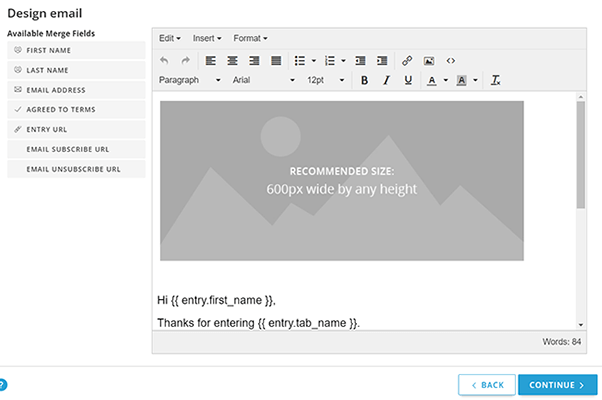
You can add Merge Fields if you want to personalize your emails for each recipient. For example, you can address each email to the recipient by name by using the First Name merge field.
Once you’ve finished setting everything up, you can preview the content by sending a test email, then click Save & Activate to launch the email campaign.
Feeds
ShortStack enables you to collect videos and images from social media posts on Instagram or Twitter that are posted alongside a specified hashtag. This is useful if you want to run social media hashtag contests.
To get started, click Feed > New Feed. Then, select your platform.

To create Instagram feeds, you’ll need a business Instagram profile. If you choose Twitter, you can choose to collect Tweets as entries when they include a specific hashtag. Or alternatively, you can collect retweets of a specified tweet as entries instead.
Once you’ve set it up, your feeds will appear on the right.
If the feed misses a post, you can add entries to it manually by clicking the dropdown button > Add Entry then pasting the post URL and entry description.
Analytics
ShortStack also offers built-in analytics for users on the Agency Plan or higher.
You can keep track of important metrics like campaign views, entries, email opens, etc from your dashboard.
And next to each campaign, you can click the pie chart icon to open up analytics for that specific campaign.

You can view historical data by choosing your date range, then visualize how traffic, entries, and shares have changed over time.
All analytics data can be exported as a PDF report.
How much does ShortStack cost?
ShortStack was originally quite expensive when I first reviewed it. But they’ve added a free plan and some more affordable tiers for their paid plans. I am VERY happy about this because the tool is fantastic and this removes my biggest gripe.
Anyway, here’s a snapshot of their pricing:
| Plan | Starting Price (Billed Annually) | Key Limits | Ideal For |
| Free | $0/mo (No card required) | 500 campaign views/mo & 200 stored entries | Testing out basic sweepstakes, quizzes, and landing pages. |
| Launch | $24/mo (or $29 month-to-month) | 25,000 views/mo & 5,000 stored entries | Basic public voting contests, social comment imports, and hashtag entries. |
| Build | $49/mo (or ~$59 month-to-month) | 100,000 views/mo & 20,000 stored entries | Refer-a-friend sweepstakes, photo/video submission contests, and custom JS. |
| Scale | $99/mo (or ~$119 month-to-month) | 300,000 views/mo & 60,000 stored entries | Multi-prize instant wins, code redemption, anti-fraud protection, & 1 team seat. |
| Max | $166/mo (or ~$199 month-to-month) | 750,000 views/mo & 150,000 stored entries | Agencies and high-volume brands needing full white-labeling and multiple team seats. |
Note: This isn’t an exhaustive list of differences. Make sure you check exactly what’s included in each plan on ShortStack’s pricing page before you sign up.
ShortStack pros and cons
Now we’ve covered features and pricing, here’s a quick recap of what we think ShortStack’s biggest strengths and weaknesses are.
ShortStack pros
- Lots of supported campaigns. One thing we like about ShortStack is how many different types of campaigns you can build and manage with it. Landing page contests, instant win contests, hashtag contests, UGC contests… if you can think of it, you can probably set it up.
- Very flexible. ShortStack offers much more control and flexibility than many other contest tools—especially the drag-and-drop builder. You can control everything right down to the pixel. And it’s also developer-friendly thanks to features like the code widget.
- Great for serious businesses. ShortStack is purpose-built for businesses. Unlike other platforms that are targeted towards solopreneurs and influencers, ShortStack comes armed with tools and features that make it uniquely well-suited to SMBs, brands, agencies, and even large enterprises. That includes things like team collaboration tools, rights management, etc.
- Contest templates. ShortStack’s contest templates are solid. They’re professionally made, look great, and there’s a good deal of variety in the template catalog to choose from. That said, we weren’t as impressed with their email templates (there’s definitely room for improvement there).
- Affordable. When I first wrote this review, ShortStack was expensive. Now though? It really isn’t. They have a free plan and the entry-level paid plan is far more affordable.
ShortStack cons
- High learning curve. We found ShortStack’s Campaign Builder to be very flexible. But equally, it was also very difficult to use. You have a lot of control. Maybe too much for some people’s needs.
- Entry restrictions. Pricing is partly based on the number of views and entries your forms will receive. This is common with these types of tools but I’m not a huge fan.
Final thoughts on ShortStack
That concludes our ShortStack review.
Overall, we think ShortStack is a great choice for serious businesses and agencies that want complete control over their campaigns.
It’s a very flexible tool and has some advanced features that few other tools in this category offer. But the high learning curve and price tag mean it may not be the best choice for beginners and solopreneurs.
If you’re still not sure whether or not ShortStack is the right choice for you, I’d recommend taking it for a test drive. You can try it out with no commitment with their generous free trial. Just click the button below to sign up.
