
How To Turn A Social Media Post Into 10 Pieces Of Cross-Platform Content


Do you struggle with content output?
Social media is a fast-moving content channel. Hundreds of millions of videos, images and text-based posts are uploaded to various platforms everyday. How is anyone expected to keep up?
In this post, you will learn how to repurpose social media content by turning one highly-engaging social media post into at least 10 different pieces of content.
1. Start with the right piece of content
The idea behind this strategy is to make content creation easier. It’s entirely possible for a short tweet to inspire dozens of social media posts, but that’s not what this strategy is for.
This strategy allows you to take one post and condense it into smaller posts. By turning one high-performing post into a content tree, you’re able to churn out content a lot faster.
There aren’t many rules for this step. Just make sure to choose a source post that performed really well for you and is fairly expansive on the topic it’s about.
The more you expand on a topic, the easier it’ll be to repurpose.
And it really is important to choose a post that earned a lot of engagement. It’s a sign that the topic the post relates to greatly interests your audience.
If you have a blog as well, consider using a blog post as your source post.
This is something we do for Blogging Wizard, such as our post on how much money podcasters make.
We turned this article into a video for TikTok:
2. Identify key points in your content
The easiest way to repurpose content is to break it down, and the easiest way to do that is by identifying the key points you make within it.
Start by answering these two questions:
- What is the purpose your source post is about?
- How does your source post support that purpose?
Using my article on how much money podcasters make as an example again, I would answer Question 1 like this:
“The purpose of this post is to inform readers about the realities of podcasting.”
I’d answer Question 2 like this:
“This post demonstrates how much money podcasters make by including data from sources who share, report or estimate the finances of podcasters. It includes figures from real podcasters as well as deals podcasters have made with brands. It also discusses common income streams podcasters use.”
It’s optional, but a third question you can ask yourself is, “who is the target audience for your post?”
Make a list to keep track of these details more effectively. Here are a few examples of details I wrote for my own post:
- Income streams for podcasters: affiliate marketing, sponsorships, subscriptions, products and memberships.
- The Diary of a CEO podcast hosted by Steven Bartlett generated over $1.2 million in one year.
- Sponsorships make up 86% of John Lee Dumas’ podcast Entrepreneur On Fire.
- The target audience for this post is small content creators looking for inspiration.
I’d fill the rest out with individual statistics I reported in the original article.
When I’m done, I’ll have an extensive list of key points to work with as I come up with content ideas for this post.
3. Take audience feedback into consideration
Social media audiences are pretty vocal. They’re not afraid to let the world know what they think of a particular creator or idea.
Sometimes this feedback is meanspirited. Other times, it demonstrates a shortfall in your original post, one you have yet to correct.
One important piece of audience feedback I’d include for this step is any content suggestions or requests my audience made.
Examples include a commenter complaining that I didn’t include stats from a particular podcaster or a commenter asking how much money they’d be able to make from 1,000 listeners.
Go through your comment section, and see if your audience asked follow-up questions or criticized your post in any way.
Add each question/critique to your list. For critique, make sure it’s about a point you forgot to include in your original post. A critique such as “lower the volume” is not helpful in this case.
4. Turn those key points into content ideas
I’ve included a bunch of ideas to get you started below. But, if you need more, check out our post on engaging types of social media content.
Idea #1: Short-form video
This idea is simple. You simply go over the key points of your post but in video form.
Here are some ideas for turning blog posts into short-form videos:
- Talking head video – Go over the key points of your article with a video of you talking to the camera
- Voiceover – Same thing, but use visuals instead of a video that includes your face
- Text-based – Same thing, but use visuals, and instead of a voiceover, cover your points with text overlays
When it comes to short-form videos, the shorter, the better. Try to aim for a runtime that’s under a minute. Your goal is to ensure this video fulfills the same purpose as your source post does.
Upload this video to TikTok, Instagram Reels, YouTube Shorts and Facebook Reels. Use a social media scheduling tool like SocialBee to upload content to multiple social media platforms from a single draft.
You can even film a second version of your video that’s optimized for professionals in your niche, then upload it to LinkedIn.
Idea #2: Long-form video
Videos that are longer than three minutes are considered long-form videos.
You can use the same techniques as I recommended for short-form videos, but just know that long-form videos will likely perform better if they contain your voice and show your face.
There are exceptions for topics that require you to screen record, such as a video in which you demonstrate how to do something with software or a video game. These don’t necessarily need to include your face, but it does help for engagement.
This idea can be a little harder to do if your source post is a short-form video. However, if you feel your source post was a little too short and didn’t really dive deep into any specific point you made, your long-form video can cover it.
If you’re turning a blog post into a long-form video, you can almost use your article as the basis for a script.
Shoot long-form videos with a smartphone if you need to for budget purposes, but make sure it’s a high-quality smartphone. Use an area of your home or office that has good lighting if you don’t have a filming space, and record the video with the rear-facing camera.
Consider upgrading to a dedicated filming setup at some point. This includes filming with a fancier camera (such as a DSLR camera), having a dedicated space where you film, using lightboxes, and editing the video with fancy software.
Idea #3: Break up videos into shorter videos
No matter if your source post was a short or long-form video or if you turned your blog post into one, you can still break it up into shorter videos.
This might not apply if your short-form video is really short, but see what you can do.
The idea behind this is simple: use a video editor to break up your video into shorter chunks.
Determine the main points of your video, specifically where they start and end. Then, turn those main points into their own short-form videos.
Finally, upload them to short-form video platforms like TikTok, Instagram, Facebook and YouTube.
Idea #4: Carousel
Carousel posts are sliders you create out of multiple images and/or videos. You can create them on TikTok or Instagram. You can even add sounds to them.
For the purposes of sharing information, it’s best to use image-based graphics instead of videos. That way users can scroll through them as fast as they like.
Carousels are a great way to share information, but you need to be able to condense that information into as few words as possible.
TikTok allows you to add 35 slides to a carousel while Instagram allows you to add 20.
Use a tool like Canva to create graphics for carousels. They have thousands of templates you can use that are already optimized for social media.
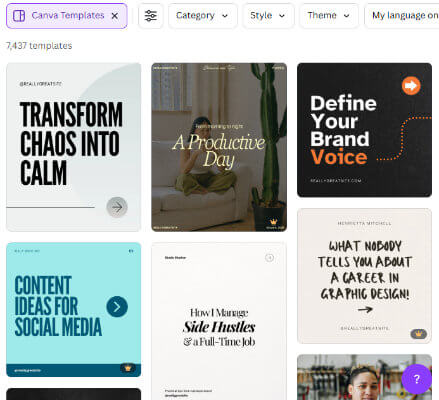
These templates will also help you figure out how much text to add to each to slide. You’ll understand pretty quickly that carousels are best when used to share key points about a topic, not deep dives.
Idea #5: Infographics
It’s hard to convey an entire idea into a single image, but you can do so with infographics.
Infographics are images that contain facts and statistics. They use a combination of graphics and text to convey facts, information and statistics.
Instead of reading an entire blog post or watching an entire video, users just need to read through this image.
This makes them incredibly easy to consume, which also makes them incredibly shareable.
Piktochart is a fantastic graphic design tool to use for infographics. They have hundreds of templates in different designs.
[piktochart-infographic-templates]
Canva has infographic templates as well.
The trouble with infographic templates is that the majority of them are long. They’re optimized for articles where users can scroll down to view more of them.
You can create a long-form infographic and edit it into chunks so it’s optimized for social media.
If this doesn’t seem plausible, use regular templates for Instagram posts and Facebook posts.
Idea #6: Threads
If you can turn your source post into a carousel, you can turn it into a thread.
A thread is a series of text-based posts you publish to Twitter (X) as well as its competitors Bluesky and Threads.
You can create thread posts on Mastodon as well.
Threads are an incredibly engaging way to present long-form content on apps that are mainly meant for text.
Each post links to the next, so users are essentially reading through a mini blog post.
If you haven’t created a carousel for your post, yet, turn the main points of your post into very small paragraphs. Each post in the thread should be no longer than three sentences, preferably.
Twitter threads can be as long as 25 tweets, but Instagram has a maximum slide limit of 20 for carousels.
If you want to create a Twitter thread out of a carousel or vice versa, it’s best to stick to 20 tweets or less.
They can accompany images and videos to make them more engaging.
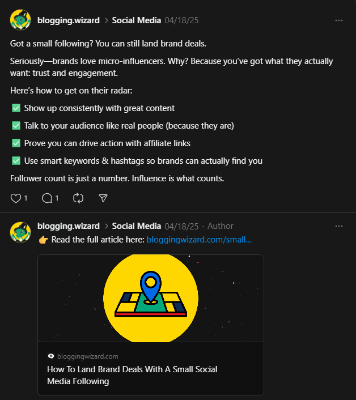
We did a two-post version of this strategy on Threads for our post on landing brand deals as a small creator.
Idea #7: Quotes
This is a great way to share memorable sentences and phrases from your source post.
Quotes can be inspirational, funny or informative, though informative posts will likely be most engaging.
Choose a main fact from your source post that was presented in a single sentence. Then, turn that sentence into a graphic with a graphic design tool.
It’s best to publish image-based quotes to Instagram and Facebook, so use whatever graphic design tool has templates for them.
You can post your quote without an image to text-based platforms like Twitter (X), Blueksy and Threads, though these platforms do support images as well.
Idea #8: Answer questions
Once you upload a social media post for your article or if your source post was a social media post, your audience will begin to comment.
Some of those comments might be questions. You can answer those questions directly, but it might be more engaging to answer with additional content instead.
TikTok does this best. It allows you to reply to a comment with a video.
You can also just film a short follow-up video by starting the video with something along the lines of, “some of you asked why…”
TikTok and Instagram do this well. They allow you to stitch/sequence your own videos.
Idea #9: Ask your audience a question
Along with creating follow-up videos that answer your audience’s questions, create a follow-up video in which you ask your audience a question.
Take the main point of your article, and ask them a question that relates to it.
For my blog post on how much podcasters make, I could ask the Blogging Wizard audience if they have podcasts, how many listeners they have and how much revenue they generate.
Idea #10: Interviews
Collaborate with other creators in your niche, or ask your audience if they’d be willing to hop on a phone or video call with you.
Then, interview them about the topic your source post is about.
For my blog post, I could interview podcasters about their podcasting experience, particularly how much revenue they generate and how they generate that revenue.
5. Choose a social media publishing schedule
If you currently publish social media posts whenever they’re completed, consider choosing a defined social media publishing schedule instead.
We have a data-driven post on Blogging Wizard about how often to post to social media.
For example, it’s recommended to post six videos to TikTok every week, three to eight Instagram reels a week, and six tweets a day to Twitter (X).
However, it’s best to choose a posting schedule that works for you. The amount of time and money you’re able to dedicate to social media content is different from everyone else’s.
When you do decide on a schedule, publish these content ideas in accordance with that schedule.
We also have data-driven guides about the best times to post to social media:
6. Use a social media scheduling tool to keep track of campaigns
Repurposing social media content isn’t just about creating more social media content. It’s about launching complex social media campaigns around a central topic.
A social media management tool like SocialBee is a fantastic tool to use to manage campaigns and track their performance across multiple posts.
You’ll be able to glance at overviews that tell you how much reach and how many engagements your entire campaign has received.
And because SocialBee also has scheduling features, you can also use it to schedule and publish multiple social media posts.
7. Approach campaigns for repurposed social media content strategically
Like I said, repurposing social media content is done best when you use your source post to create a content tree with your source post being the trunk of that tree and each repurposed post representing a branch.
This means they all work together toward the same campaign. Consider what goal you want to accomplish from that campaign.
Do you want more traffic to your website? More social media followers? More email subscribers? More affiliate revenue? More sales from your own products?
Choose one goal, and include a call to action for that goal in your source post. Don’t worry about this step if the post is old and can’t be edited as you should include a call to action in your shorter posts as well.
This call to action should lead to a link on your link-in-bio page.
Then, fill your publishing schedule with content that relates to your source post, and don’t fill your publishing schedule with any other content that week.
The idea is to give your audience more content to consume that relates to your source post. This gives you better odds of reaching your goal for this campaign.
Final thoughts
Every social media post you publish has more mileage you might realize.
You don’t need to reinvent the wheel each time.
So, take your best social media posts and turn them into as many pieces of supplementary content as you can.
Use the 10 ideas I discussed above to help you get started but don’t be afraid to add more.
