
Cross-Channel Content Calendars: Coordinating Your Blog And Social Media For Maximum Impact


Do you run your blog and social media marketing strategies independent from one another? Do you want to coordinate your content calendars for each channel and create a more uniform content marketing strategy?
Creating content is a fulltime job. That’s why “content creator” is its own career and job titles like “content manager” and “social media manager” exist.
But if you’re on a tight budget, you might find yourself publishing whatever content you can get done in a week without worrying about strategy.
In this post, you will learn how to manage a cross-channel content calendar.
What is a cross-channel content calendar?
A cross-channel content calendar is an editorial calendar that includes planned content for every marketing channel you publish content to.
This mainly means your blog and social media channels, including Instagram, Facebook and YouTube, but you can also include email content and podcast episodes if you publish unique content to these channels.
It’s easy to get in the habit of planning strategies for these channels independent from one another or even simply publishing content whenever you finish it without worrying about planning.
A lot of blogs, in particular, primarily publish articles then use social media to promote those articles.
A content calendar makes you more aware of the types of content you’re publishing to each channel and how much content you’re publishing to each channel.
It also makes it easier to plan marketing campaigns that involve more than one content channel.
Related: Add Consistency to Your Editorial Calendar by Syncing Your Content
What are the benefits of running a cross-channel marketing campaign?
A multichannel marketing campaign has a lot of benefits:
- Solidifies your brand strategy
- Gives your audience multiple content formats to consume for the same topic
- Gives your audience something to look forward to
- Helps each content channel market the other
- Simplifies your content strategy by allowing you to focus on the same topic for a while
- Boosts the amount of reach your marketing campaigns receive
Some of your audience only reads your blog. Some only consume the content you publish to social media.
By running a campaign that spans across multiple content channels, you’re able to introduce more of your blog audience to your social media content and vice versa.
Your audience can start their content experience in one channel and continue it in the other.
As a content creator, researching and planning topics is half the struggle of creating new content. By focusing on one topic or theme, you’re able to create multiple pieces of content from one set of research. This simplifies content production.
Finally, if you include all of your content channels in one marketing campaign, you improve the odds of that campaign seeing success.
Instead of relying on one or two social media posts to spread the word about your campaign, you can create multiple forms of content to increase its reach.
Are there any cross-channel content calendar tools?
You can manage quite a bit with a spreadsheet app, such as Google Sheets or Excel.
StoryChief and CoSchedule are two content management tools that enable you to add blog posts alongside social media posts in a unified content calendar.
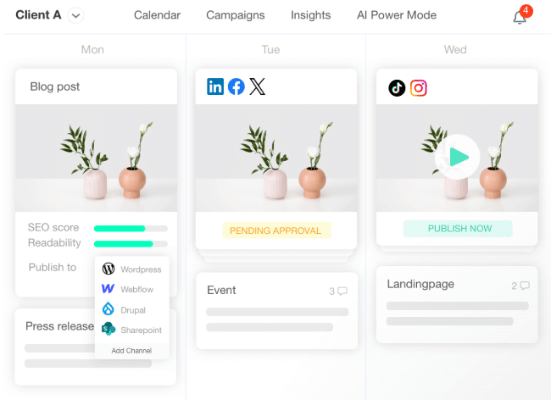
There are social media calendar tools as well. For example, I’m a big fan of SocialBee for social media scheduling, but it doesn’t include blog posts in its calendar.
Project management tools work as well, especially tools like Notion, Monday.com, Asana and ClickUp, all of which would be suitable.
How to manage a cross-channel content calendar
1. Set clear content marketing goals
The best place to start is to identify the goals you want to accomplish with your content.
Here are examples of content marketing goals you can set for yourself:
- More engagements on social media
- More engagements on specific social media channels, such as Instagram, Facebook, etc.
- More website traffic
- More traffic for a specific page
- More product sales
- More sales for a specific product
- More email subscribers
There’s a content path that will help you meet each of these goals. Identifying the goals you want to accomplish will help you find the right path.
For example, if you want to generate more sales for a specific product, you should plan a week’s worth of content that relates to that product, making sure to include every content channel you publish to.
2. Create balance among all channels in your content calendar
The easiest way to coordinate content between different channels is by coming up with a defined schedule for each channel and sticking with it every week.
Make sure two content channels do not overlap. While you can publish content to different channels on the same day, don’t publish them at the same time.
The exception would be content you deliberately cross promote to multiple channels. These should be published at the same time, something you can do automatically if you use a social media publishing tool.
Make a list of every content channel you publish content to. Then, write down every day and time of the week you want to publish content to each one.
We have a few useful guides you can use to help you decide:
- The Best Time To Post On TikTok
- The Best Time To Post On Facebook
- The Best Time To Post On Twitter
- The Best Time To Post On LinkedIn
- The Best Time To Post On Instagram
Make sure to look at your analytics on social media as well. They should tell you when your audience is most active. You can view this data in Google Analytics as well to see when your blog receives the most traffic.
Here’s a simple example of the kind of schedule you can create for your brand:
| Content Channel | Day to Post | Time to Post |
| Blog | Tuesdays, Friday | 12PM |
| Instagram Reel | Daily | 2PM |
| Instagram Post | Mondays, Wednesdays, Friday | 5PM |
| Instagram Carousel | Thursdays | 2PM |
| YouTube Video | Fridays | 11AM |
3. Come up with content ideas to fill your content calendar with
Now that you’ve come up with a schedule for publishing content, it’s time to fill it with content.
Most businesses who do use a set schedule try to fill each timeslot with the best content idea they can think of. This is a fine content marketing strategy to use, and it’ll definitely make you more consistent.
However, if you come up with content themes to follow every week, you can use this schedule to design a coordinated marketing campaign that will help you achieve your goals faster.
Normally, content themes are different buckets you can organize your content into with each bucket representing an overarching topic in your niche.
For example, the lifestyle niche might have different buckets for fashion, beauty, wellness and diet.
At the same time, you can create much smaller content themes that represent individual topics you cover at length by dedicating a lot of content to it in a short period of time.
Let’s say I wanted to create a couple of content themes for an SEO blog. I’d plan one week’s worth of content around the topic of link building and another around guest posting.
Here are a few ideas I could come up with for these content themes:
- Link building
- Long-form blog post that covers everything about link building
- Instagram reel on identifying which of your blog posts need backlinks
- Instagram reel on finding potential websites to request backlinks from
- Instagram reel on backlink outreach strategies
- Guest posting
- Long-form blog post that covers everything about guest posting
- Instagram reel on identifying the goals you want to accomplish with guest posting
- Instagram reel on finding websites to write guest posts for
- Instagram reel on outreach strategies to use for guest posting
Let’s see how we can work these ideas into a unified content calendar.
4. Organize everything into a unified content calendar
This step will be a little different depending on the type of content calendar you decide to use.
Again, StoryChief and CoSchedule are dedicated content management tools that allow you to integrate all of your content channels into one calendar.
Project management tools like Trello and Monday.com work as well.
However, for the purposes of this post, I created a simple spreadsheet in Google Sheets:
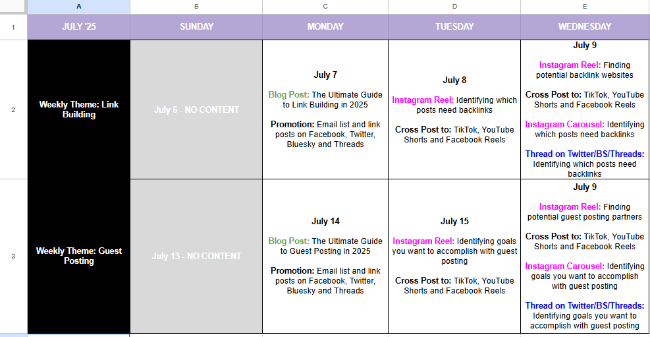
Each row contains all of the content ideas I’ve come up with for a particular theme, each of which is arranged based on the days I feel they should be published on.
I included notes for myself. On days where I plan to publish a blog post, I remind myself to publish link posts for it on Facebook, Twitter (X), Bluesky and Threads. I also remind myself to send an email campaign for it.
On days where I plan on publishing Instagram reels, I remind myself to cross post each reel to other short-form video platforms, including TikTok, YouTube Shorts and Facebook Reels.
I also include plans on how to repurpose reels as text-based threads for Twitter (X) and its competitors Bluesky and Threads.
It’s not the most sophisticated content calendar design, but it lets me see all of the ideas I’ve come up with at a glance.
Google “content calendar templates google sheets” to find calendar designs you can import into Google Sheets.
5. Optimize content for each platform
Each platform has its own set of rules that dictates which content formats perform well on each.
For instance, although TikTok videos can be up to an hour long, they perform much better when they’re under a minute. This is likely due to TikTok’s original maximum runtime of 15 seconds.
As you plan content, think about how to optimize it for each platform you publish to.
Blog posts can be quite long. Short-form videos should be shot with a smartphone and presented in a way that’s easily digestible. Instagram posts should be captivating while carousels should be filled with simple yet intriguing graphic designs.
Related: How Long Should a Blog Post Be?
Optimizing content for each platform is easy if each of your ideas is original. If you’re repurposing your original blog post into social media content, you’re going to need to spend a little more time considering how to optimize each post.
Don’t forget to be a social media user yourself. The best way to learn about what kind of content works best on each platform is to spend time consuming content from that platform.
6. Choose a republishing system
Planning content themes week after week can be exhausting. It takes a coordinated effort from you and your team and gives you strict deadlines to follow to stay on task.
For this reason, it may be best to take every other week off by publishing other types of content during off weeks.
For these weeks, you can use the same schedule, but instead of coming up with a content theme for the week, come up with content pillars to create content for.
Here are common pillars you can use:
- Educational
- Inspirational
- Entertaining
- Engaging
- Promotional
So, if you have an Instagram reel timeslot to fill on each weekday, create educational reels on Mondays, inspirational reels on Tuesdays, entertaining reels on Wednesdays, etc.
If you suddenly realize you haven’t created any content for a specific timeslot, find a post you published in the past that fits that particular timeslot’s content pillar, and republish it.
You can even republish old posts on a set schedule with SocialBee’s requeue feature. This feature allows you to create content variations so you’re not reposting the same posts verbatim.
7. Best practices for managing a multichannel content calendar
- Define your brand tone. Don’t be stiff and professional in one video and goofy in the next
- Create symmetry in the content styles and formats you use
- Check in with your audience regularly to determine what kind of content they want from you
- Repurpose existing content from one content channel to a different content channel, but be sure to optimize it for that new channel
- Plan collaborations for multichannel marketing campaigns in advance
- Plan sponsorships and affiliate promotions in advance
- Stay on top of trends and industry news for each content channel you publish to
- Use the right content calendar tool for your brand and/or team
- Schedule content in advance so it publishes automatically
- Cross promote content from one content channel to another
- Be prepared to make changes on the fly if something goes wrong
- Engage with your audience throughout campaigns
- Gather and monitor data from cross-channel content marketing campaigns
Final thoughts
Setting up cross-channel content calendars is a challenge.
There are unified tools that you can use but they’re expensive and some features are usually on the weaker side (e.g. social scheduling) compared to dedicated tools.
Ultimately, the best thing is to find an approach that works for you and your business.
That might mean using a basic spreadsheet or a custom setup in Notion to give you a top-level overview, then using dedicated tools for blog posts, social posts and emails.
Regardless of how you tackle this, cross-channel content calendars help you keep everything in sync. Your content and your team.
