
The Best Buffer Alternatives Compared For 2026


Are you looking for the best alternatives to Buffer? We’ve got you covered.
Buffer is one of the more popular social media tools around but some users find their feature set rather limited compared to alternatives on the market.
The good news is that you have plenty of alternatives to choose from.
In this post, you’ll find the best Buffer alternatives for social media managers and proactive business owners. We’ll also give you an idea of who they’re best for as well as their features and pricing.
The best Buffer alternatives – TL;DR
SocialBee is the best for those primarily looking to replace Buffer’s publishing capabilities.
If, on the other hand, you’d like to replace all of Buffers features and you need an all-in-one tool – Sendible is a great option. It’s affordable for teams and individuals alike.
And if you’re looking for a great balance between functionality and affordability, check out Viraly.
1. SocialBee

SocialBee is—in our opinion—the best Buffer alternative overall. Not only is it affordable, but it also has a robust set of features that goes far beyond Buffer’s social media publishing functionality.
This social media scheduling tool uses categories to make publishing content more efficient. For instance, using categories will allow you to make changes to posts that belong to the same group in bulk. You’ll have the ability to assign, approve (or unapprove), or delete posts in the same category all at once.
You can also pause an entire category in case you want to stop posting specific types of posts for the time being.
It also allows its users to customize how their posts would appear on social media platforms. This way, you’re always sure that you’re observing the best practices for each social network.
SocialBee will let you post on Facebook, Twitter, LinkedIn, Instagram, Pinterest, and Google Business.
You can set posts to go live at a specific time. You can also save hashtags by category, social profile, or platform then use them on all your posts. And you won’t have to guess what your posts will look like once they’re live since there’s a post preview feature available.
Pricing: Plans start from $29/month, save 16% when billed annually. Get started with a 14-day free trial.
Learn more in our SocialBee review.
2. Sendible

Sendible is the best Buffer alternative for those that need a complete “all-in-one” solution to social media. But let’s start with it’s scheduling functionality.
You can publish content to a wide variety of social networks in advance (including TikTok). Or you can assign to a member of your team for approval. You also get the option to tailor your posts for each social network.
In addition to the more traditional social scheduling workflow, you have the option to create social queues like you would with Buffer. Sendible can also calculate optimal sending times for your social shares.
The visual calendar will make it a breeze for you or anyone on your team to see which posts are scheduled to go live and when. You can use RSS feeds to create content from articles pulled from your websites.
You can engage with your audience as well. Either via a social inbox or social streams. This gives you the best of both worlds. The inbox will have a delay but it allows you to assign conversations to your team. The social streams feature allows you to reply to comments/mentions in real-time.
Sendible also offers a robust suite of analytics and reporting functionality. You’ll learn a lot from your post engagements, mentions, audience, and other important metrics.
Pricing: Creator ($25/month billed annually), Traction ($76/month billed annually), Scale ($170/month billed annually), Expansion ($340/month billed annually).
Learn more in our Sendible review.
3. Pallyy

Pallyy primarily focuses on Instagram but it also works for other social media platforms. It’s a visual social media scheduler, making it more convenient to check on posts that you have on your queue.
Its Instagram Feed Planner feature is what you need to finally polish your feed. You can quickly add new media to your Instagram then rearrange the feed by dragging and dropping them into place. This makes your IG feed look more cohesive and professional. There’s an app you could install if you want to manage your IG through your phone or tablet.
There’s even an Instagram Bio Link feature that’ll help you add more links to your Instagram bio. This should help bring more traffic to your other business pages or social profiles. You can track the performance of your Bio Link through built-in analytics.
You can also schedule posts for Instagram. You just upload the media you want to use, drag it to the calendar, and add a caption. Pallyy uses the official Instagram API platform so you shouldn’t encounter any issues.
You can schedule content to popular social networks like Facebook, Instagram, YouTube, Threads, X (Twitter), TikTok, LinkedIn, and more.
Should you need it, there’s also a social media inbox included that’s extremely easy to use. As is the rest of the platform.
Pricing: Plans from ($15/month, annual discounts available)
Learn more in our Pallyy review.
4. Viraly
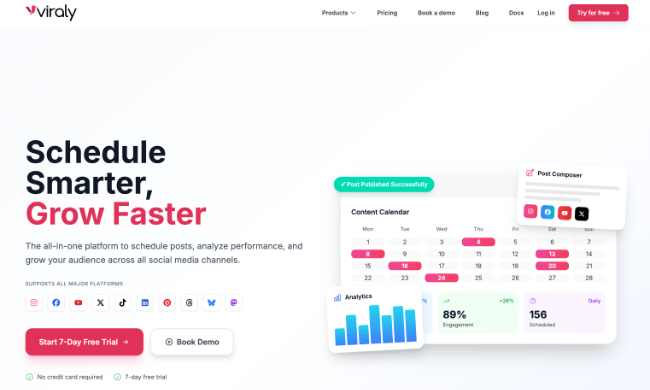
Viraly is a great Buffer alternative for scheduling posts across popular social platforms. Similar to Buffer, it offers posting and analytics tools.
The UI is clean and easy to understand which I really like. Social profiles are grouped into social sets which makes it easy to keep different brands separate – making it ideal for agencies and freelance social media managers.
You can create draft posts, then schedule them for a later date, publish them immediately, or add them to the next available slot of your content queue.
Like Buffer, Viraly supports most popular platforms. This includes Facebook, Instagram, X, Pinterest, YouTube, Threads, LinkedIn, etc.
First comments can be scheduled to platforms that support it. Currently this includes Facebook, Instagram, LinkedIn, and YouTube.
During the content creation, you can use the AI caption generator to write, rephrase, or adjust the caption tone.
Also, you can use the in-browser photo and video editing features for cropping, resizing, adding filters, and annotations.
You can easily store and manage all of your media before publishing. From here, you can edit your media to look more professional.
For those looking for robust team functionality, Viraly has you covered. You can easily allow team members to connect channels, create posts, schedule & publish posts, and even manage permissions.
Viraly offers an analytics suite where you can view detailed post metrics across all supported social platforms. This includes detailed channel insights with visual graphs and charts for supported platforms. Also, you can export post analytics in CSV format for in-depth performance insights.
Pricing: Free plan available. Plans start from $19/month, save 17% when billed annually.
Read our Viraly review.
5. ContentStudio

ContentStudio is another great Buffer alternative for those that need an all-in-one social media tool. It has all the features you’ll need to handle all of your social media activity.
Let’s start with inbox management. With ContentStudio, you have the ability to consolidate direct messages from all of your social media profiles and reply to all of them from one location. And if you don’t have the time to answer, you can quickly assign them to other members of your team.
ContentStudio also has publishing features that’ll let you draft and schedule posts for publishing. It makes it so easy to collaborate with your team in real-time. There is an approval process built into the workflow for your convenience.
You also get access to an extensive suite of social media analytics. This includes competitor research. For example, you can track the progress of your competitors on platforms like Facebook and Instagram.
You’ll also find AI content generation, influencer research, and content curation tools as well.
Pricing: Starts from $25/month. Yearly discounts and free trial available.
6. Sprout Social

Sprout Social is another great Buffer alternative. It’s best described as an all-in-one social media management tool.
It has a scheduling feature with optimal send time recommendations. There’s an asset library where you can create, organize, edit, and publish content from within the same tool. You’ll find content suggestions if you need some inspiration. It allows message tagging and has a URL tracking feature too.
The SproutLink feature will let you add more links in your Instagram bio.
You can have Sprout Social compile all your messages so that you can reply to all of them from one place. And if there’s a sudden spike in messages, it will send you an alert. There’s even an option for you to build chatbots to automate some of your replies.
You can track conversations about your brand, do consumer research, explore customer sentiments, do campaign analysis, and so much more.
Pricing: Standard ($249/user per month), Professional ($399/user per month), Advanced ($499/user per month). Save up to 25% with annual billing.
Final thoughts
And that wraps up our collection of the best alternatives to Buffer.
But which of these Buffer alternatives should you choose? That will depend on your needs, social media strategy, and budget.
Would you rather an all-in-one social media management tool that does it all? In that case, Sendible is the best option. It includes social media analytics, publishing, listening, and a unified inbox.
Do you want the best dedicated social media scheduling tool? SocialBee is the tool to choose.
The good news is that most of these tools offer free plans or free trials so you can find the ideal one for your needs.
Finally, it’s worth noting that you can’t go wrong with any of these tools. Any one of them can help you drive positive results for your social media marketing campaigns.
